Vi
Vi
 En
En
 简体中文
简体中文
 日本語
日本語
'%2F><path%20id%3D'Path_249'%20data-name%3D'Path%20249'%20class%3D'cls-1'%20d%3D'M109.655%2C40h-12.9c-.417%2C0-.759.225-.759.5s.341.5.759.5h12.9c.417%2C0%2C.759-.225.759-.5S110.072%2C40%2C109.655%2C40Z'%20transform%3D'translate(-90.407%20-36.388)'%2F><path%20id%3D'Path_250'%20data-name%3D'Path%20250'%20class%3D'cls-1'%20d%3D'M55.836%2C72h-15.2a.514.514%2C0%2C1%2C0%2C0%2C1h15.2a.514.514%2C0%2C1%2C0%2C0-1Z'%20transform%3D'translate(-36.207%20-65.498)'%2F><path%20id%3D'Path_251'%20data-name%3D'Path%20251'%20class%3D'cls-1'%20d%3D'M211.034%2C104h-2.276c-.417%2C0-.759.225-.759.5s.341.5.759.5h2.276c.417%2C0%2C.759-.225.759-.5S211.452%2C104%2C211.034%2C104Z'%20transform%3D'translate(-191.648%20-94.608)'%2F><path%20id%3D'Path_252'%20data-name%3D'Path%20252'%20class%3D'cls-1'%20d%3D'M40.759%2C105h12.9c.417%2C0%2C.759-.225.759-.5s-.341-.5-.759-.5h-12.9c-.417%2C0-.759.225-.759.5S40.341%2C105%2C40.759%2C105Z'%20transform%3D'translate(-35.952%20-94.608)'%2F><path%20id%3D'Path_253'%20data-name%3D'Path%20253'%20class%3D'cls-1'%20d%3D'M55.836%2C136h-15.2a.536.536%2C0%2C1%2C0%2C0%2C1.055h15.2a.536.536%2C0%2C1%2C0%2C0-1.055Z'%20transform%3D'translate(-36.207%20-123.279)'%2F><%2Fsvg>)


IPO Stock
IPO Stock
1. Accesing the feature In the Menu, select "Trading" → "IPO" 2. IPO Registration Step 1: Keep track of IPO stock code information and timelines
Đấu giá mới nhất
1. Accesing the feature
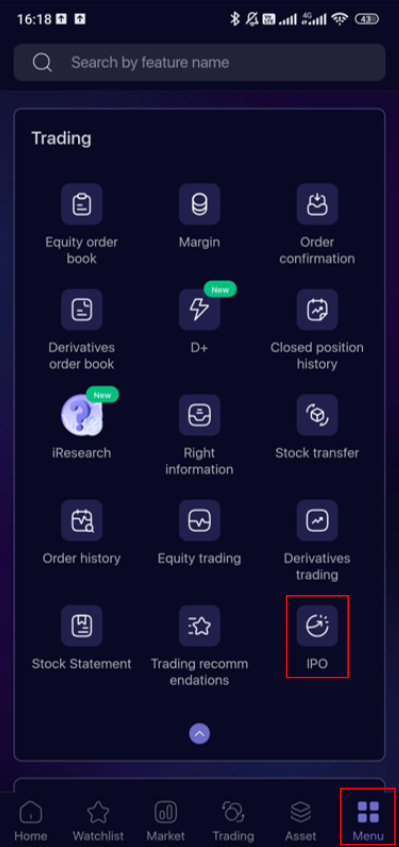
In the Menu, select "Trading" → "IPO"
2. IPO Registration
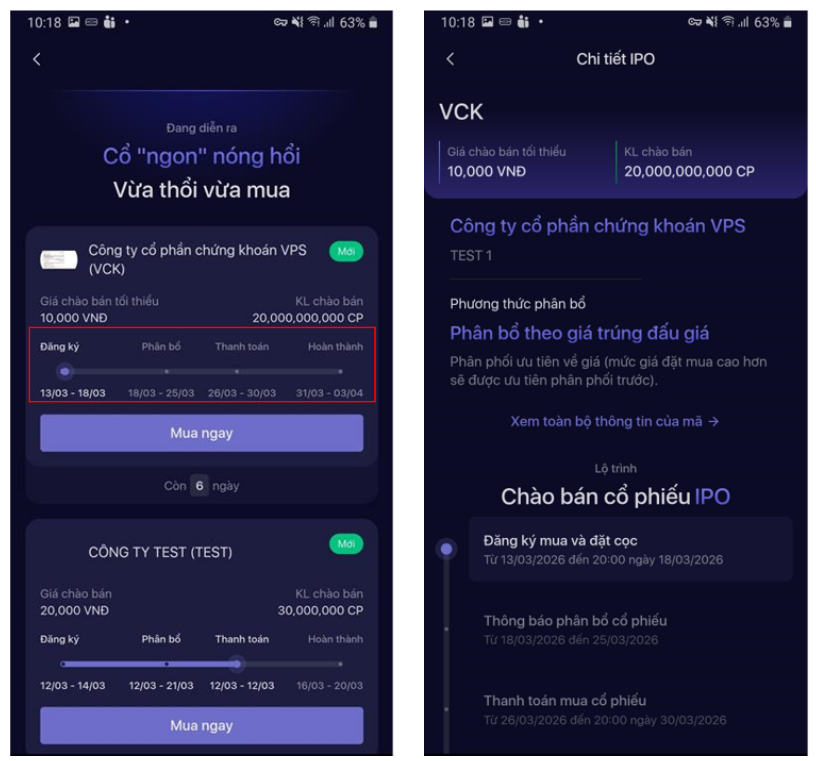
Step 1: Keep track of IPO stock code information and timelines according to the registration process in the Overview scren, click "Purchase Now" on the IPO stock you are interested in
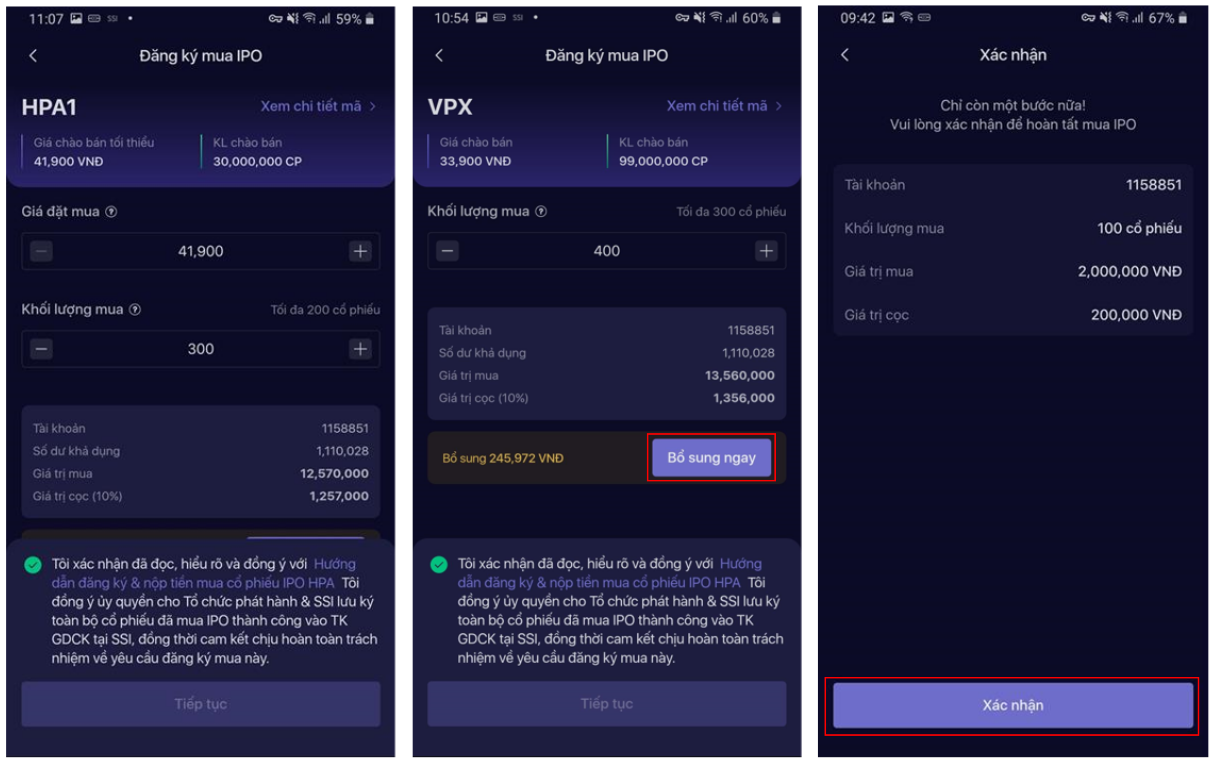
Step 2: Review and enter the Purchase price (for auction-based IPOs) and Purchase volume, agree to the terms and conditions, then click Continue and confirm using the registered authentication method to complete the order
* Click View Payment Information to view the deposit payment information. Please make payment before the deadline specified in the instructions to ensure the purchase order remains valid
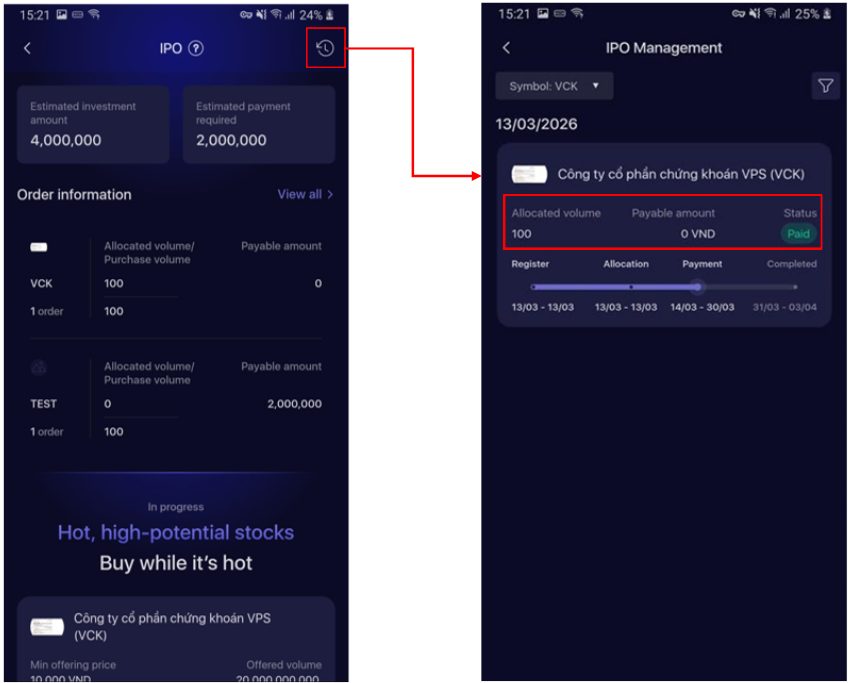
Step 3: Keep track of the registration status on the IPO Management screen by clicking View Transaction Status on the successful order confirmation screen, or by clicking the Clock icon in the top-right corner of the Overview screen.
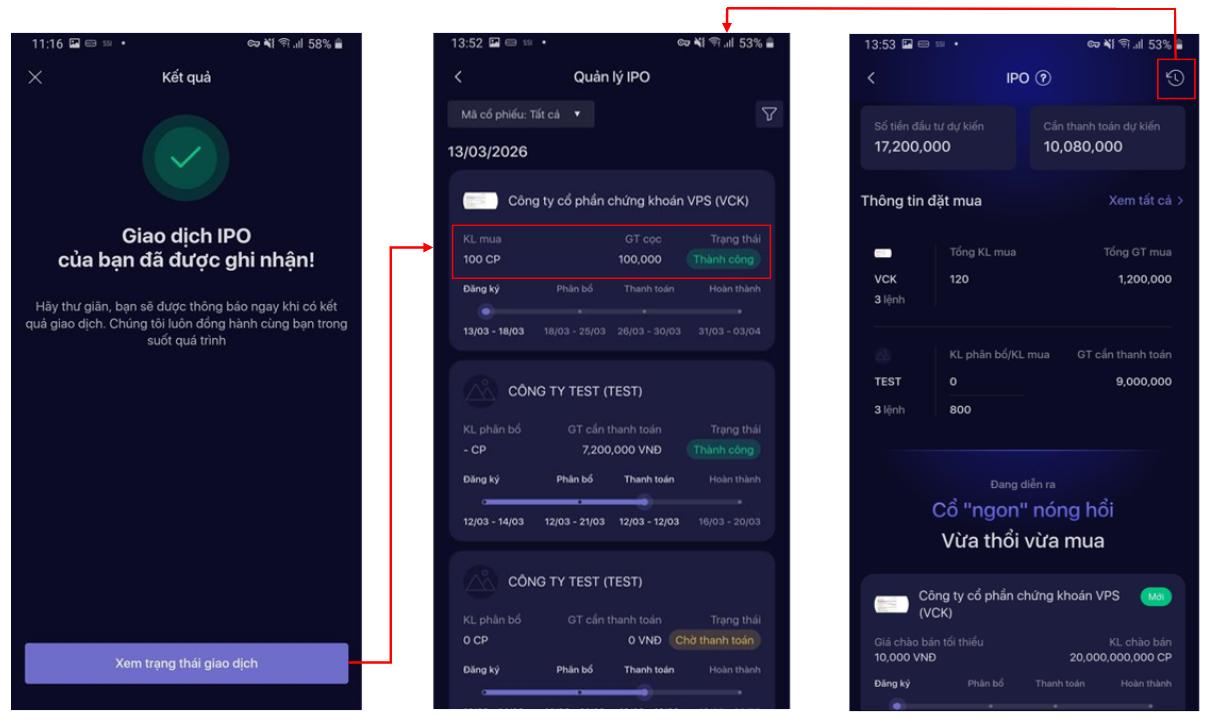
*After placing an order, customers can keep track of their order information directly on the Overview screen:
- Order Information: An overview of purchase orders for each active IPO code. Customers can click View All to see all placed IPO orders.
- Estimated investment amount: The total purchase value of all active IPO codes.
- Estimated payment required: The expected payment amount for all active IPO codes.
3. IPO Allocation
Keep track of the allocation status of registered IPOs in the order information area of the IPO Overview screen or in the order details on the IPO Management screen.
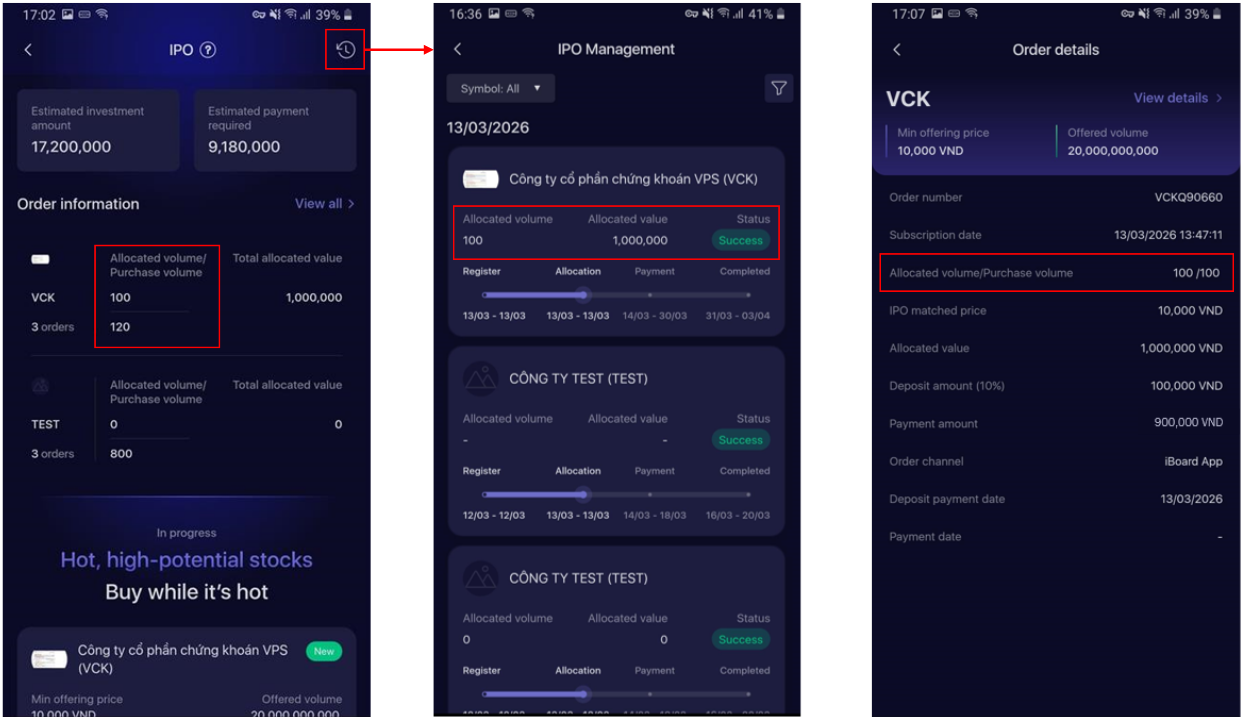
4. IPO Payment
Step 1: Click "Pay Now" on the codes that are in the pending payment phase on the IPO Overview or Management screen.
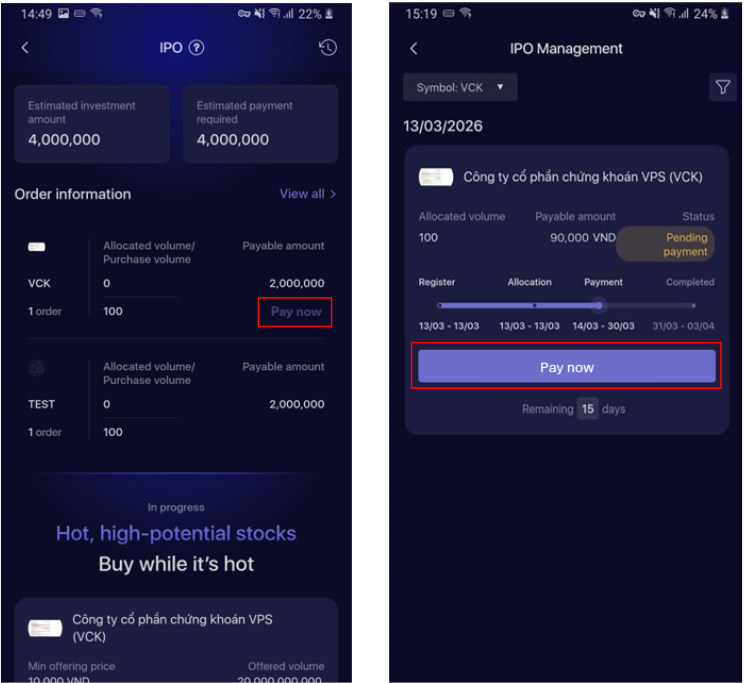
Step 2: Click View Payment Information to view the payment information.
* Please make payment before the deadline specified in the instructions to ensure the purchase order remains valid.
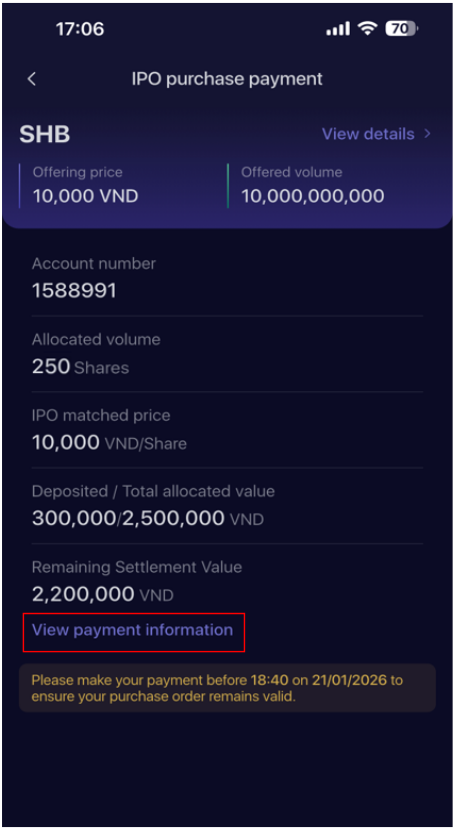
Step 3: Keep track of the payment status on the IPO Management screen by clicking the Clock icon in the top-right corner of the Overview screen.