Vi
Vi
 En
En
 简体中文
简体中文
 日本語
日本語
'%2F><path%20id%3D'Path_249'%20data-name%3D'Path%20249'%20class%3D'cls-1'%20d%3D'M109.655%2C40h-12.9c-.417%2C0-.759.225-.759.5s.341.5.759.5h12.9c.417%2C0%2C.759-.225.759-.5S110.072%2C40%2C109.655%2C40Z'%20transform%3D'translate(-90.407%20-36.388)'%2F><path%20id%3D'Path_250'%20data-name%3D'Path%20250'%20class%3D'cls-1'%20d%3D'M55.836%2C72h-15.2a.514.514%2C0%2C1%2C0%2C0%2C1h15.2a.514.514%2C0%2C1%2C0%2C0-1Z'%20transform%3D'translate(-36.207%20-65.498)'%2F><path%20id%3D'Path_251'%20data-name%3D'Path%20251'%20class%3D'cls-1'%20d%3D'M211.034%2C104h-2.276c-.417%2C0-.759.225-.759.5s.341.5.759.5h2.276c.417%2C0%2C.759-.225.759-.5S211.452%2C104%2C211.034%2C104Z'%20transform%3D'translate(-191.648%20-94.608)'%2F><path%20id%3D'Path_252'%20data-name%3D'Path%20252'%20class%3D'cls-1'%20d%3D'M40.759%2C105h12.9c.417%2C0%2C.759-.225.759-.5s-.341-.5-.759-.5h-12.9c-.417%2C0-.759.225-.759.5S40.341%2C105%2C40.759%2C105Z'%20transform%3D'translate(-35.952%20-94.608)'%2F><path%20id%3D'Path_253'%20data-name%3D'Path%20253'%20class%3D'cls-1'%20d%3D'M55.836%2C136h-15.2a.536.536%2C0%2C1%2C0%2C0%2C1.055h15.2a.536.536%2C0%2C1%2C0%2C0-1.055Z'%20transform%3D'translate(-36.207%20-123.279)'%2F><%2Fsvg>)


Conditional Orders
Đấu giá mới nhất
TERMS AND CONDITIONS OF USING CONDITIONAL ORDERS
Conditional order at SSI Securities Corporation (SSI) is the tool to support Client to buy/sell at the pre-determined price based on order triggering conditions. When Client chooses to place a conditional order, SSI understands that Client has read, fully understood regulations/operating principles of conditional orders and agrees to apply, co-operate and follow the Terms and Conditions as prescribed by SSI, including but not limited to the following terms:
INTRODUCTION AND GENERAL GUIDELINES ON CONDITIONAL ORDERS

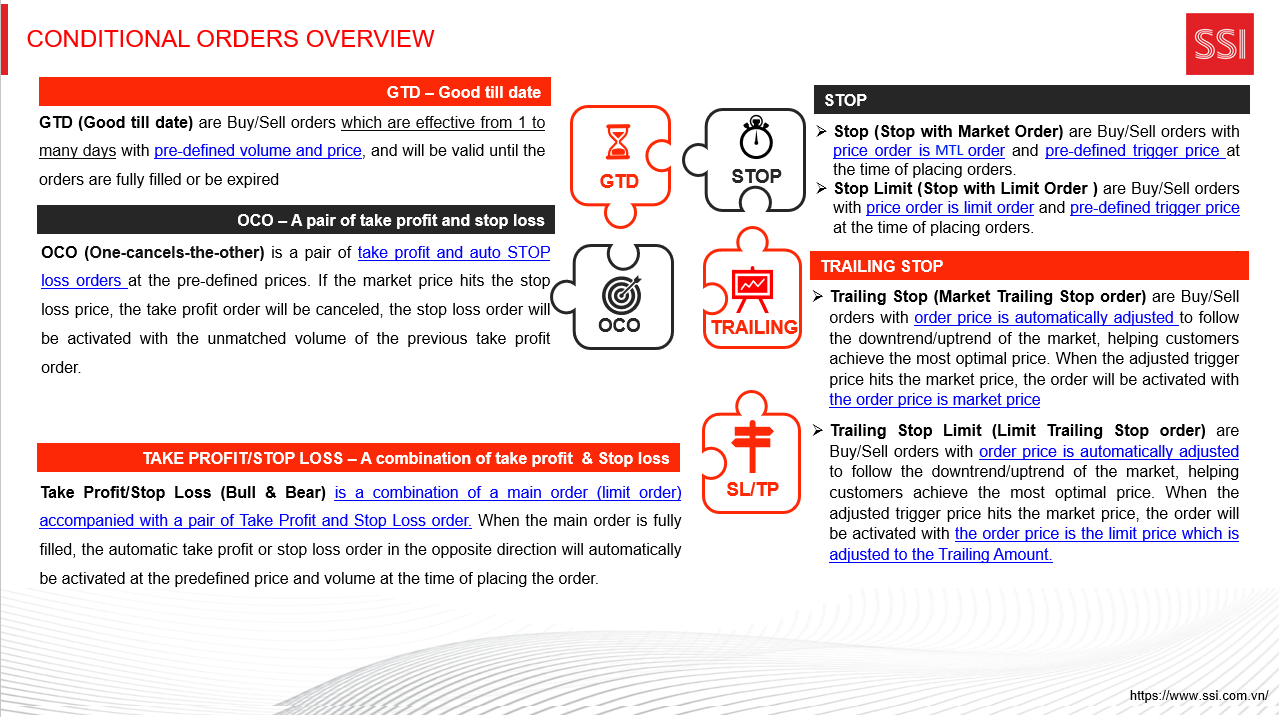
CONDITIONAL ORDERS USER GUIDE
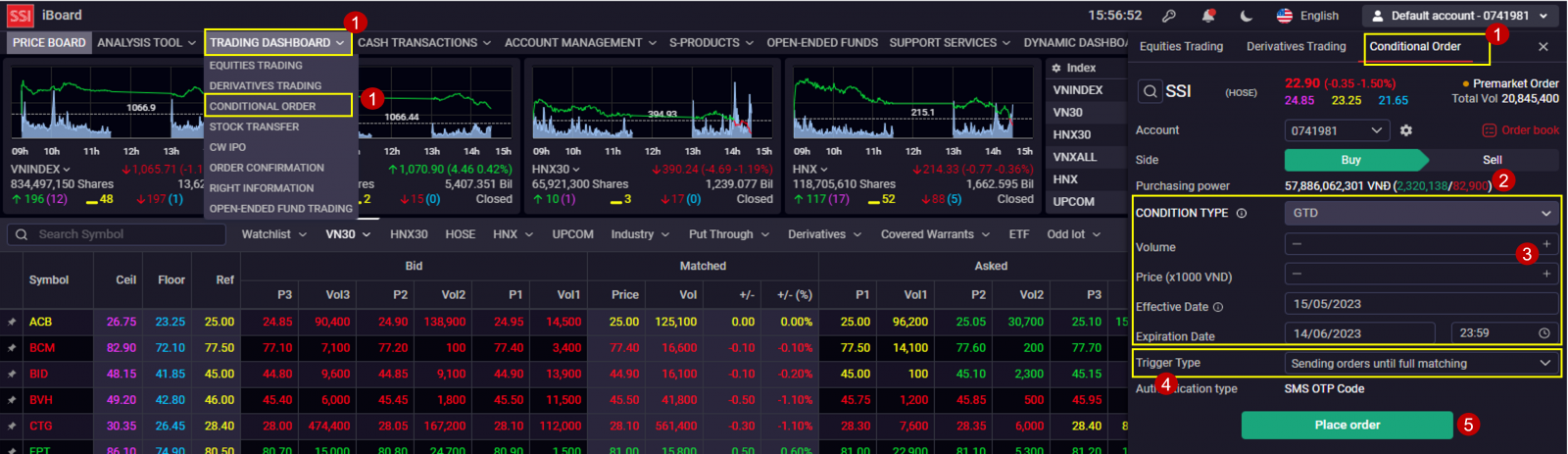
- Effective date: The starting effective date. From this day, orders which match criteria will be triggered
- Expiration date: The ending effective date by hour (maximum 1 month from effective date). After this time, The COOs and arising orders from COOs will be expired
- Sending only one order: The order is only activated once when the conditions are satisfied within the validity period
- Sending orders until full matching: The order is triggered many times/many days until being fully matched within the validity period. Order that has been arisen but has not been fully filled/filled will be continuing to arise at 8:30 AM on the next trading day if the order satisfies the balance, price and trading limit conditions.
CONDITIONAL ORDER BOOKS
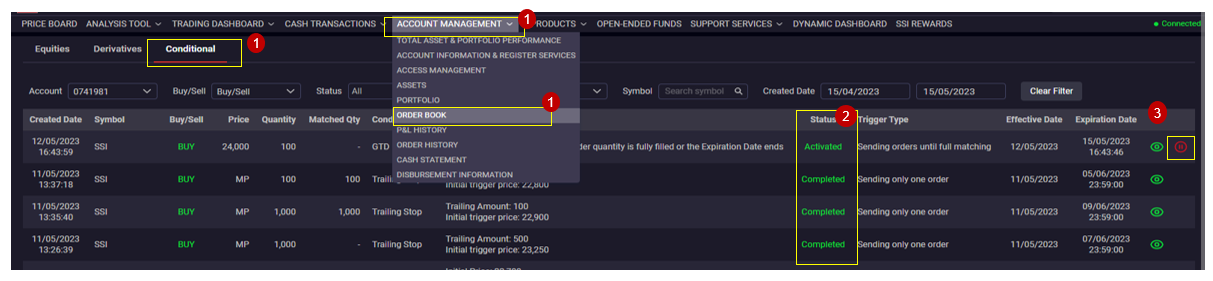
1. Choose Account Management > Order book > Conditional tab
2. Order status including:
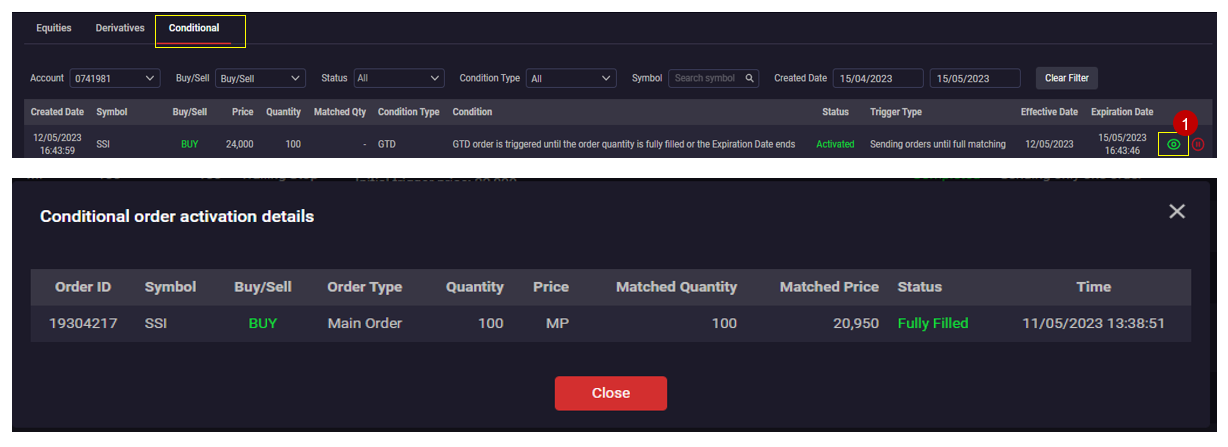
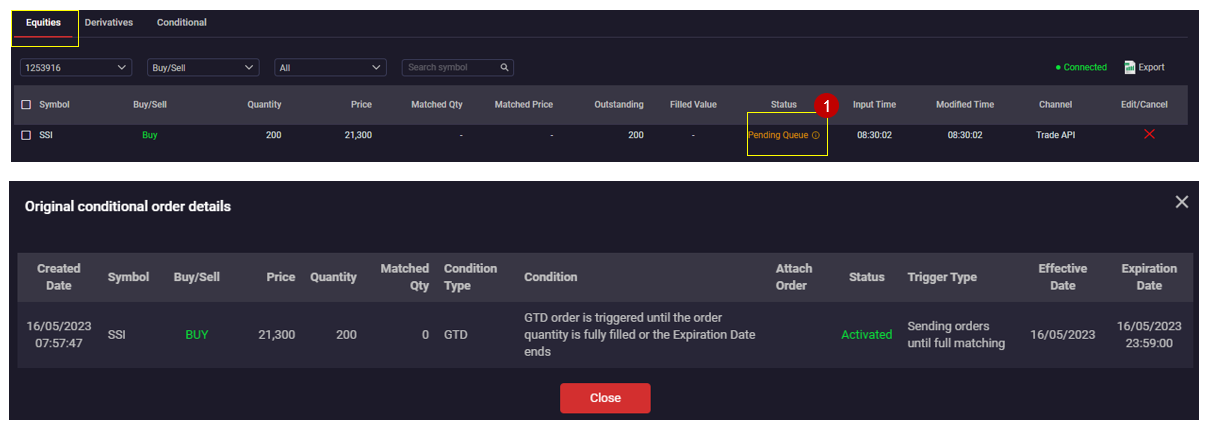
Original Conditional Order Book
1. At the Normal Conditional Order Books, click icon (i) at the status column to view the Original conditional order book detail
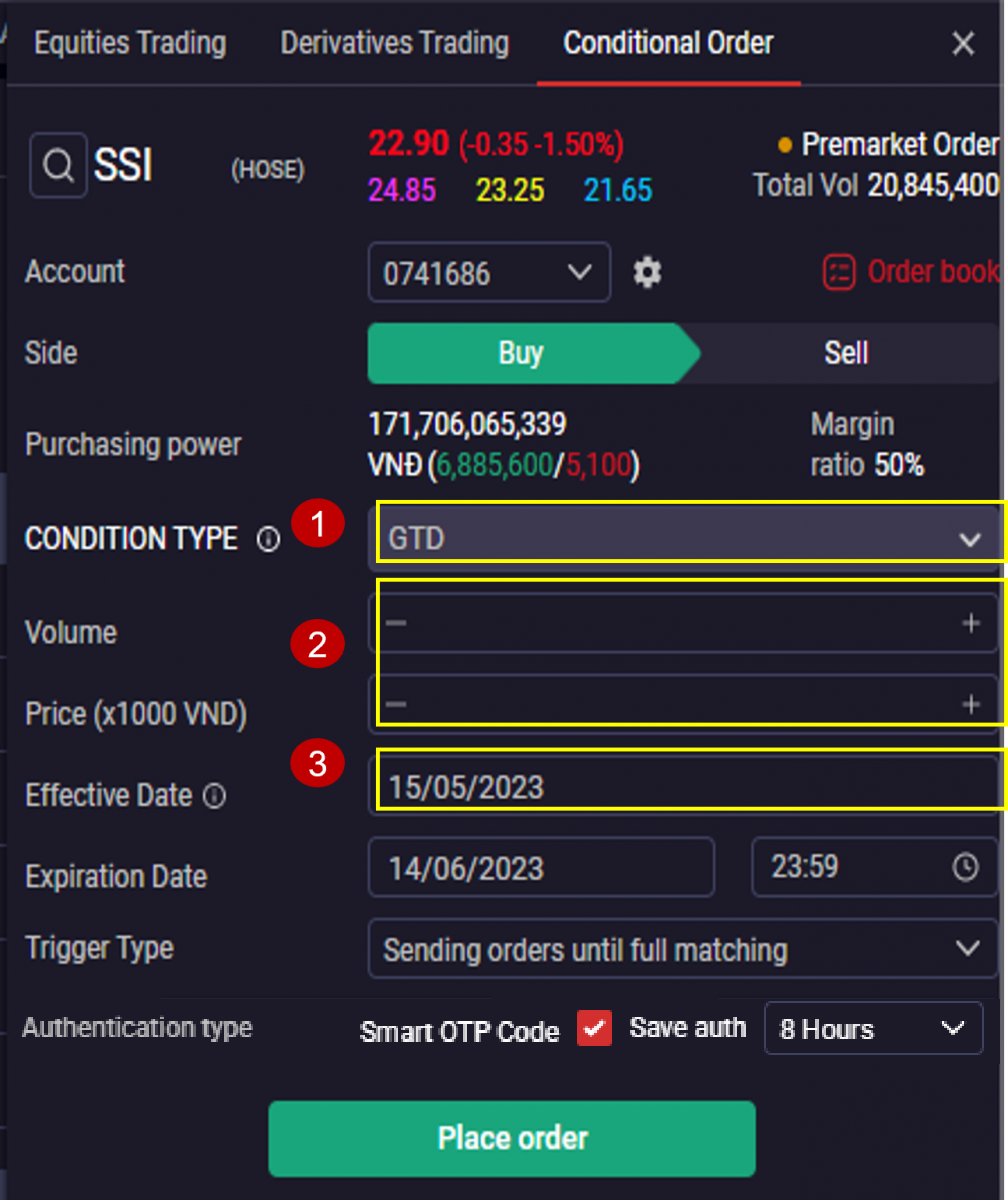
GTD (GOOD TILL DATE)
GTD (Good till date) are Buy/Sell orders which are effective from 1 to many days with pre-defined volume and price, and will be valid until the orders and fully filled or be expired
Instruction of placing order:
1. Price: Limit Price
2. Choose Effective date & Expiration date:
Orders with multi-day validity will be activated at 8:30 AM daily if the conditions on price, stock balance and purchasing power are satisfied. In the trading session of the effective date, the order will be activated immediately after placing.
3. Trigger type: Sending orders until full matching
Example
On 06/04/2023, customer A wants to sell 1000 SSI with price 26. He places GTD with Price 26, Volume 1000, Effective Date 06/04/2023, Expiration Date 05/05/2023 (23:59)
STOP – STOP WITH MARKET ORDER
STOP (STOP with Market Order) are Buy/Sell orders with market price and pre-defined trigger price at the time of placing orders. The order is activated when the price & balance conditions are satisfied during the continuous execution session. In case the order satisfies the price condition but does not satisfy other conditions, at 1:00 PM during the day, the system will re-check the activation condition with the target trigger price again.
Instruction of placing order:
1. Choose trigger condition: ≥ or ≤ trigger price
2. Trigger Price: The price that determines the trigger point of STOP Order
3. Price: Market price ( MTL for HOSE – equity, MTL for HNX equity, derivatives)
4. Choose Effective date & Expiration date
5. Trigger type: Sending only one order or sending orders until full matching
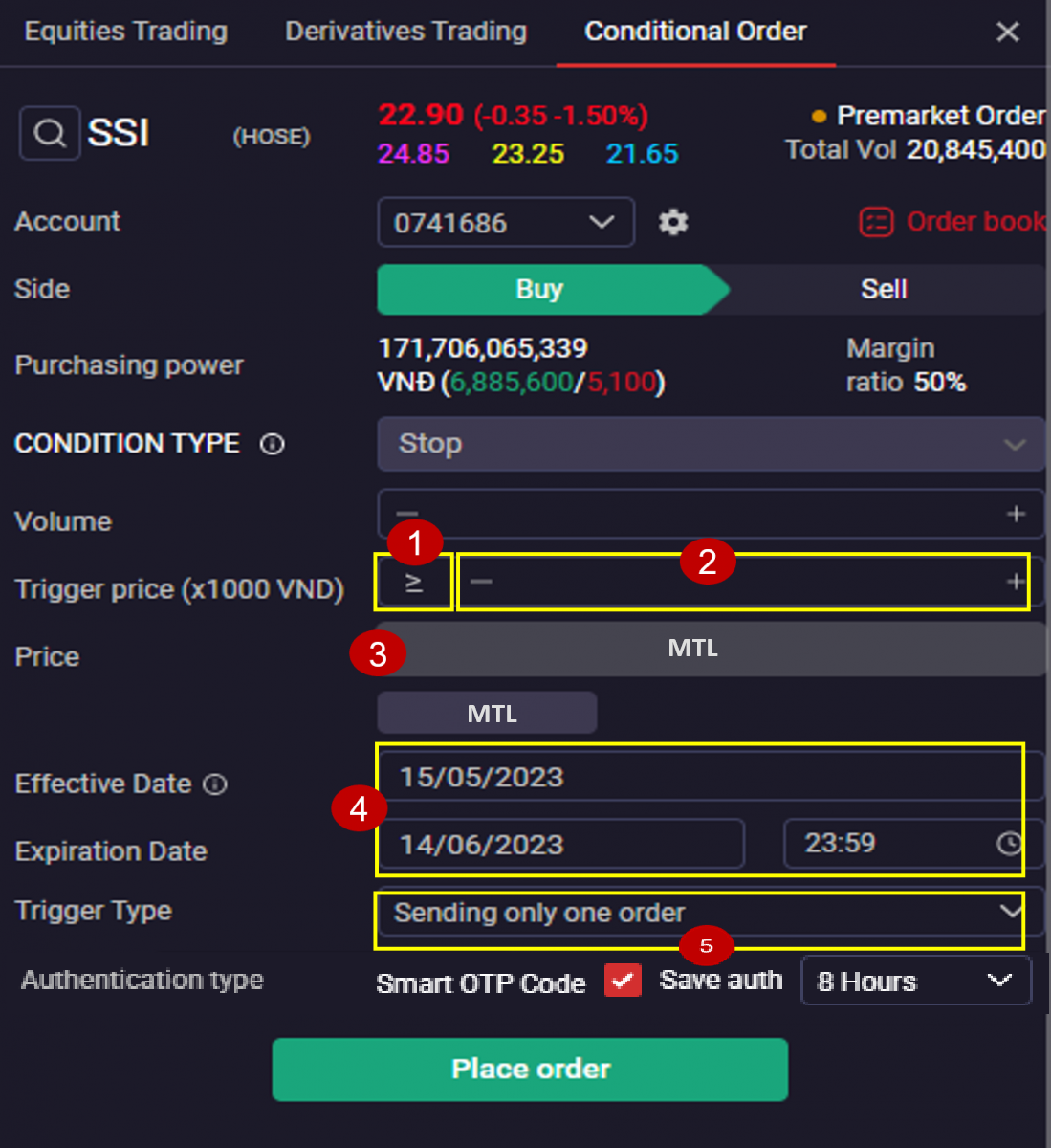
STOP – STOP WITH MARKET ORDER
Example:
Customer A owns 1000 SSI and does not have much time to monitor the market, wants to take profit at the price of 25. The current market price of SSI is 23, the customer places a STOP order with the following parameters:
Trigger price ≥ 25 Volume: 1000
Price: MTL Trigger Price: Sending orders until full matching
Effective date: 10/04/2023 Expiration date : 17/04/2023
Supposed that after customer places order, the market price of the SSI changes as follows:
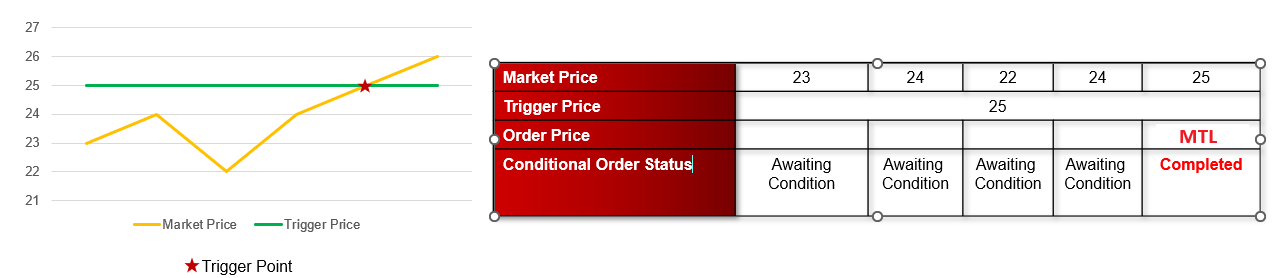
When Market Price ≥ 25, order will be triggered, order status is changed to Acitvated. Sell Order SSI volume 1000 price MTL is automatically sent to the system
→ Therefore, the STOP order helped customers automatically take profits at the desired price without having to closely monitor the market price movement.
STOP LIMIT – STOP WITH LIMIT ORDER
Stop Limit (Stop with Limit Order ) are Buy/Sell orders with price order is limit order and pre-defined trigger price at the time of placing orders.
The order is activated when the price & balance conditions are satisfied during the continuous execution session. In case the order satisfies the price condition but does not satisfy other conditions, at 1:00 PM during the day, the system will re-check the activation condition with the trigger price.
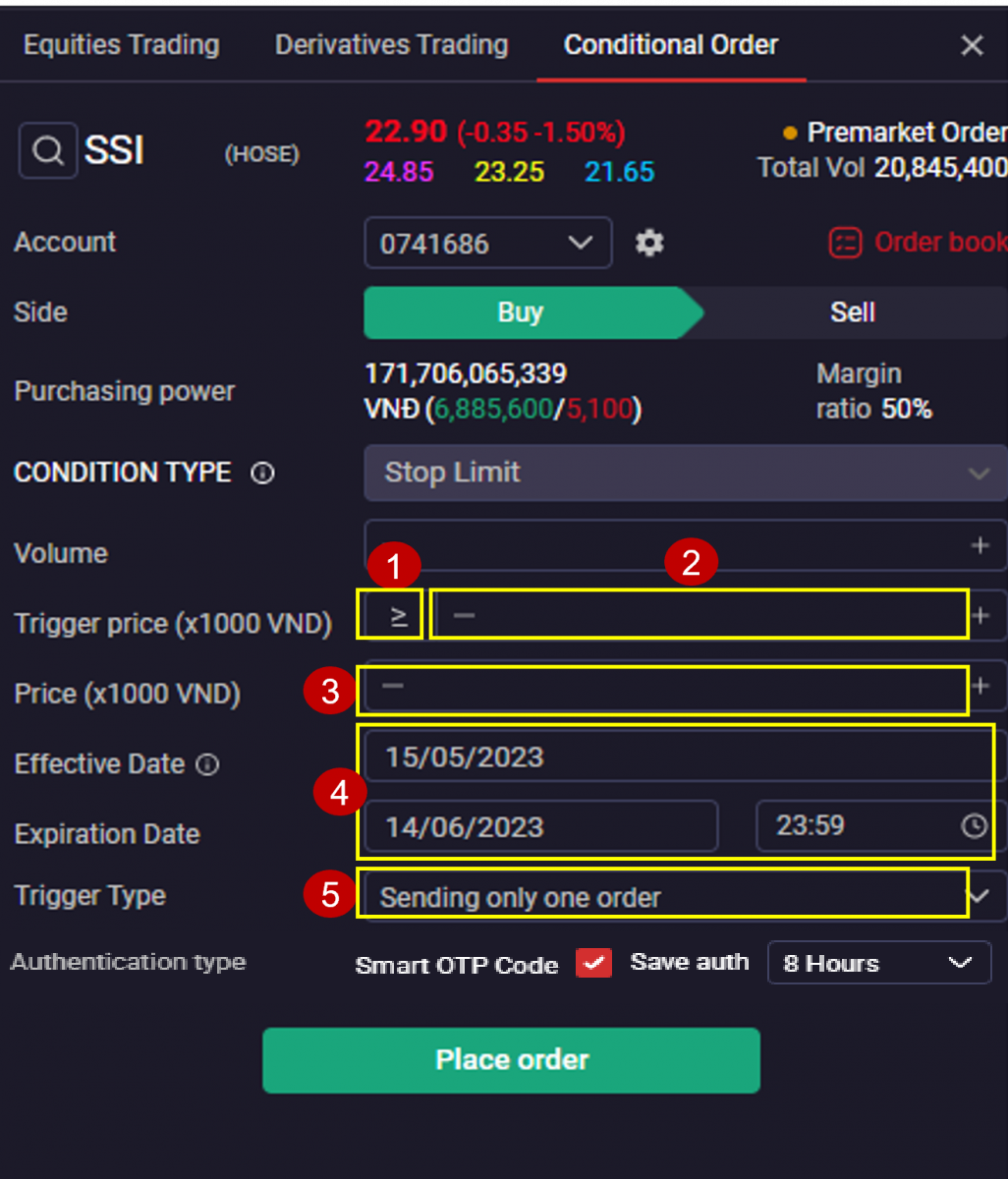
Instruction of placing order:
1. Choose trigger condition: ≥ or ≤ trigger price
2. Trigger Price: The price that determines the trigger point of Stop Order
ØWith the condition ≥ Trigger Price: Order will be activated if Market Price ≥ Trigger Price
ØWith the condition ≤ Trigger price: Order will be activated if Market Price ≤ Trigger Price
3. Price: Limit order
4. Choose Effective date & Expiration date
5. Trigger type: Sending only one order or sending orders until full matching
Example
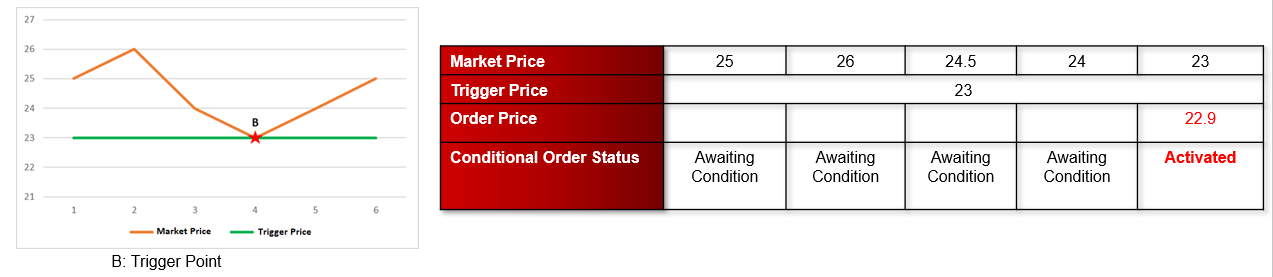
SSI is trading at the price 25, customer A predicts the market has a downtrend and wants to buy into SSI with the expected price < 23, customer A places a Stop Limit order with the following parameters:
Trigger Price: ≤ 23 Volume: 1000
Order Price: 22.9 Trigger Type: sending orders until full matching
Effective date: 10/04/2023 Expiration date: 17/04/2023
Supposed that after customer places order, the market price of the SSI changes as follows:
TRAILING STOP ORDER (TRENDING MARKET ORDER)
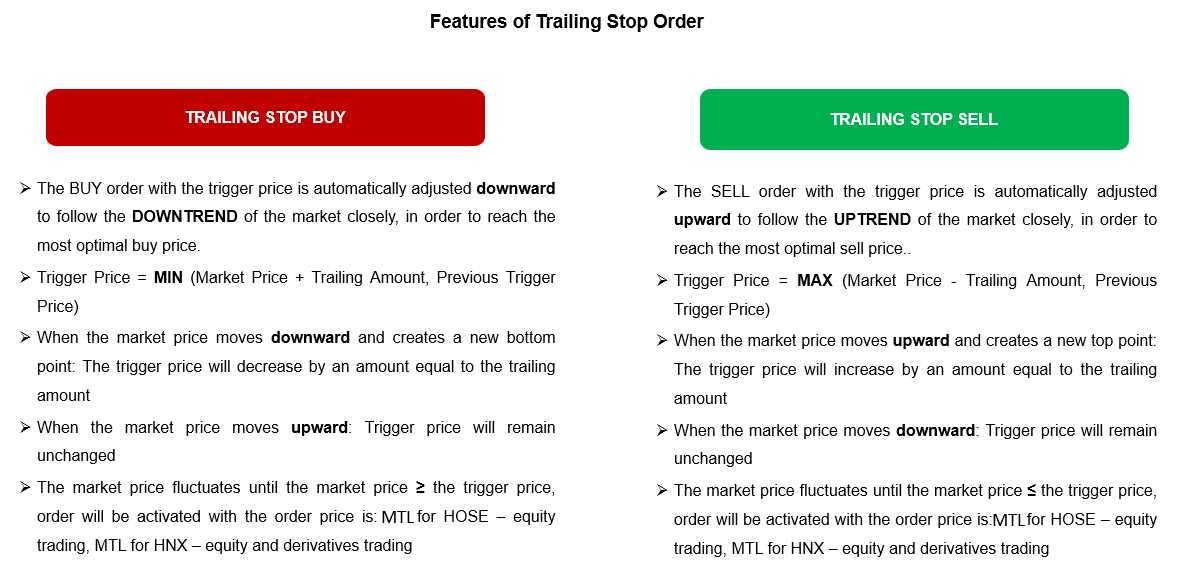
Trailing Stop Order (Trending Market Order) are Buy/Sell Orders with order price is automatically adjusted to follow the trend of the market, which help customers achieve the most optimal price.
In trading session, when the adjusted trigger price hits the market price, order will be sent into the system with the order price is market price
If the order satisfies the price condition but does not satisfy another conditions, at 1:00 PM during the day, the system will continue to re-check trigger conditions
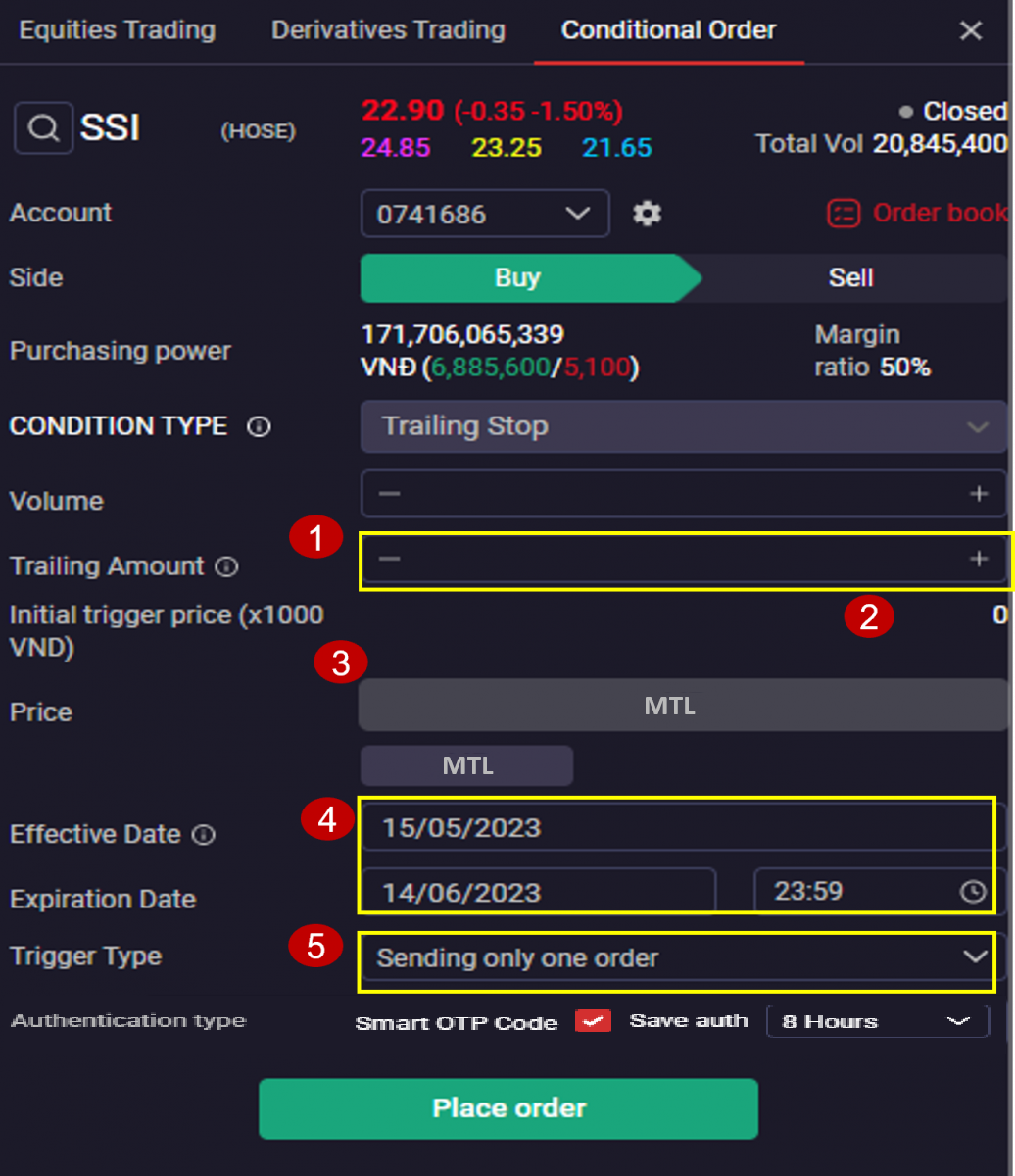
Instructions for Placing order
1. Enter Trailing Amount: is the difference between the Market Price and the Trigger Price when placing order
2. Initial trigger Price: is the provisional trigger price calculated at the time of placing the order, determined by the formula :
ØFor buy orders: Initial trigger price = Market price + Trailing amount
ØFor sell orders: Initial trigger price = Market price – Trailing amount
3. Order price: Is Market Price (MTL for HOSE – equity trading, MTL for HNX – equity and derivatives trading)
4. Select effective date and expiration date
5. Trigger Type: Sending only one order or Sending orders until full matching
TRAILING STOP BUY ORDER
Example
The current market price of SSI is 80. Customer predicts that market price will decrease and expects to buy SSI at the most optimal price that follow the trend of the market closely. Customer can place conditional order as follows:
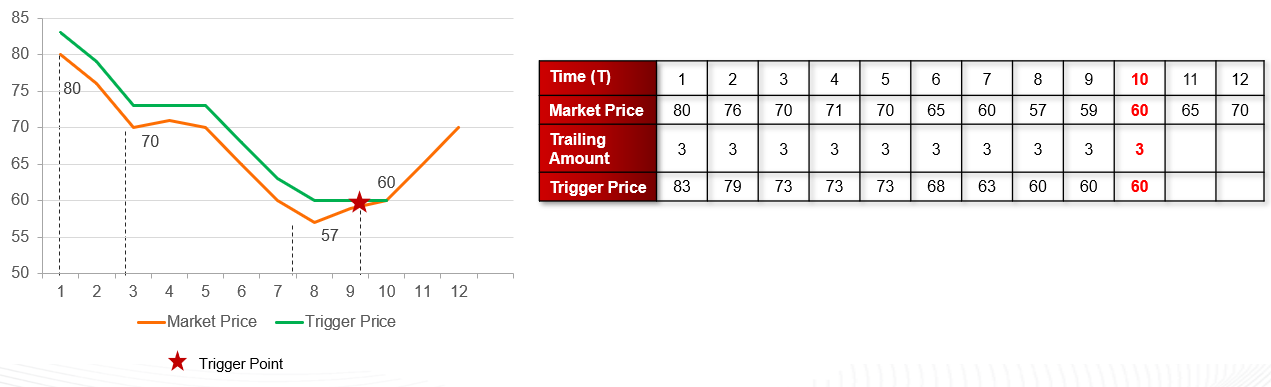
At the first time (T1): Initial trigger price = Market Price + Trailing Amount = 83
At subsequent times (T2-T3), the market price decreases => trigger price decreases corresponding = MIN (Market Price + Trailing Amount, Previous Trigger Price)
At the fourth and fifth time (T4-T5), the market price increases then decreases but the new bottom point has not been created => trigger price remains unchanged
The market price continues to fluctuate until the market price hits the trigger price (T10) at the price of 60, the order is activated with price = market price as MTL, the status of conditional order switches to Activated
→ Therefore, the Trailing STOP Buy Order helped customers achieve optimal point to buy when the market reverses with the principle of automatic slippage at the market price by a predetermined amount
TRAILING STOP SELL ORDER
Example
The current market price of MWG is 65 . Customer predicts that market price will increase and expects to sell MWG at the most optimal price that follow the trend of the market closely. Customer can place conditional order as follows:
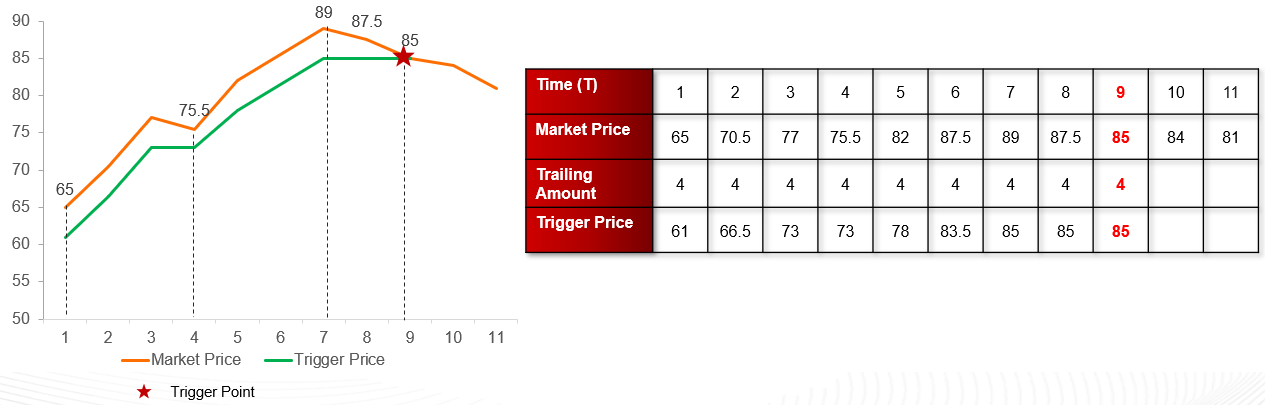
At the first time (T1): Initial trigger price = Market Price - Trailing Amount = 61
At subsequent times, the market price increases => trigger price increases corresponding = MAX (Market Price - Trailing Amount, Previous Trigger Price)
At the fourth and eighth time, the market price decreases then increases but the new top point has not been created => trigger price remains unchanged
The market price continues to fluctuate until the market price hits the trigger price at the price of 85, the order is activated with price = market price as MTL, volume = 1000, the status of conditional order switches to activated
→ Therefore, the Trailing STOP Sell Order helped customers achieve optimal point to sell when the market reverses with the principle of automatic slippage at the market price by a predetermined amount
TRAILING STOP LIMIT ORDER (TRENDING LIMIT ORDER)
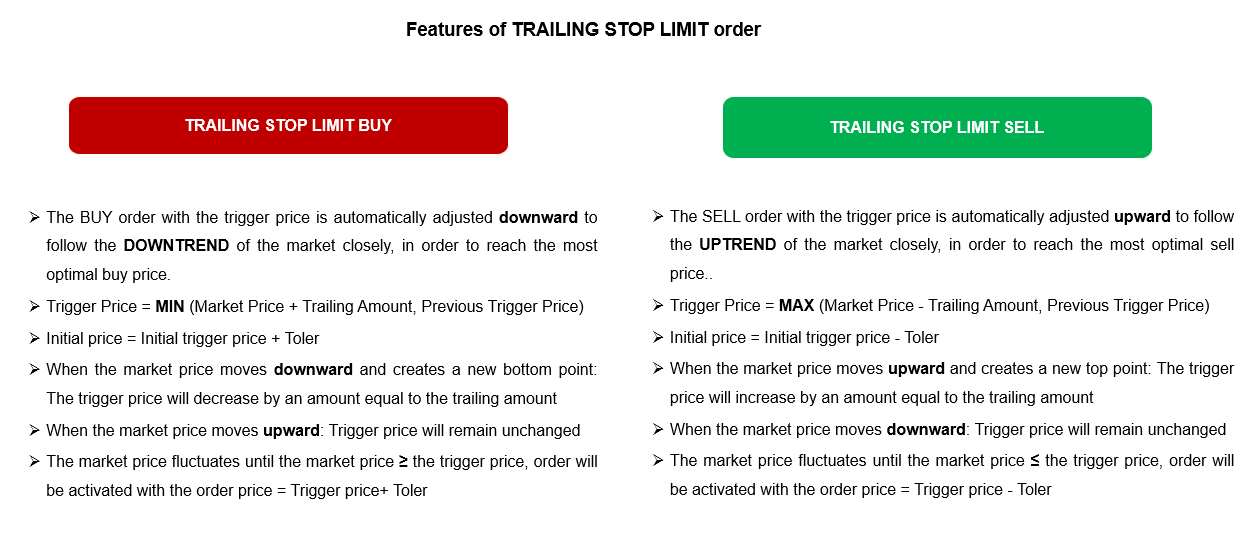
Trailing Stop Limit Order (Trending Limit Order) are Buy/Sell Orders with order price is automatically adjusted to follow the trend of the market, which help customers achieve the most optimal price. In trading session, when the adjusted trigger price hits the market price, order will be sent into the system with the order price is limit price adjusted by toler
If the order satisfies the price condition but does not satisfy another conditions, at 1:00 PM during the day, the system will continue to re-check trigger conditions
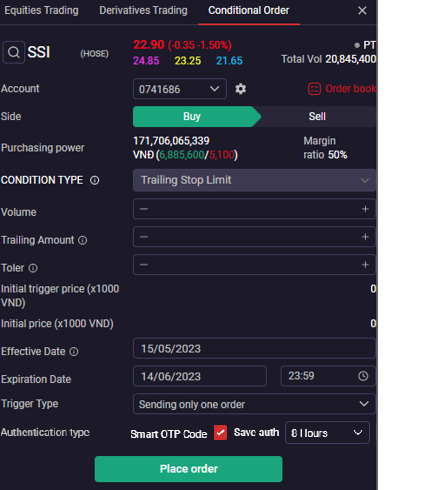
Instructions for Placing order
1. Enter Trailing Amount: is the difference between the Market Price and the Trigger Price when placing order
2. Toler: Is the difference between the market price and order price at the activated time, which help to increase the successful matching opportunities
3. Initial trigger Price: Is the provisional trigger price calculated at the time of placing the order, determined by the formula :
ØFor buy orders: Initial trigger price = Market price + Trailing amount
ØFor sell orders: Initial trigger price = Market price – Trailing amount
4. Initial Price: Is the provisional order price calculated at the time of placing order, determined by the formula:ØFor buy orders: Initial price = Initial trigger price + Toler
ØFor sell orders: Initial price = Initial trigger price – Toler
5. Select effective date and expiration date
6. Trigger Type: Sending only one order or sending orders until matching
TRAILING STOP LIMIT BUY ORDER
Example
The current market price of FPT is 100. Customer predicts that market price will decrease and expects to buy FPT at the best price that follow the trend of the market closely and optimize matching opportunity. Customer can place conditional order as follows:
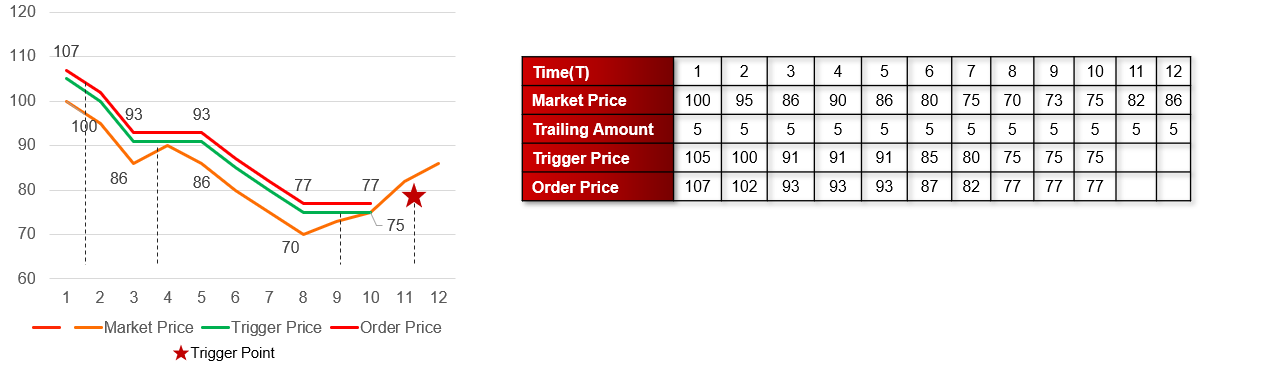
When placing order (T1): Initial trigger price = Market Price + Trailing Amount = 105
Initial Price = Initial trigger price + Toler = 107
At subsequent times (T2-T3), the market price decreases => trigger price decreases corresponding = MIN (Market Price + Trailing Amount, Previous Trigger Price)
At the fourth and fifth time (T4-T5), the market price increases then decreases but the new bottom point has not been created => trigger price remains unchanged
The market price continues to fluctuate until the market price hits the trigger price (T10) at the price of 75, the order is activated with price = trigger price + toler = 77, the status of conditional order switches to activated
→ Therefore, the Trailing STOP Limit Buy Order helped customers achieve optimal point to buy when the market reverses with the principle of automatic slippage at the market price by a predetermined amount
TRAILING STOP LIMIT SELL ORDER
The current market price of FPT is 65 . Customer predicts that market price will increase and expects to sell FPT at the most best price that follow the trend of the market closely and optimize matching opportunity. Customer can place conditional order as follows:
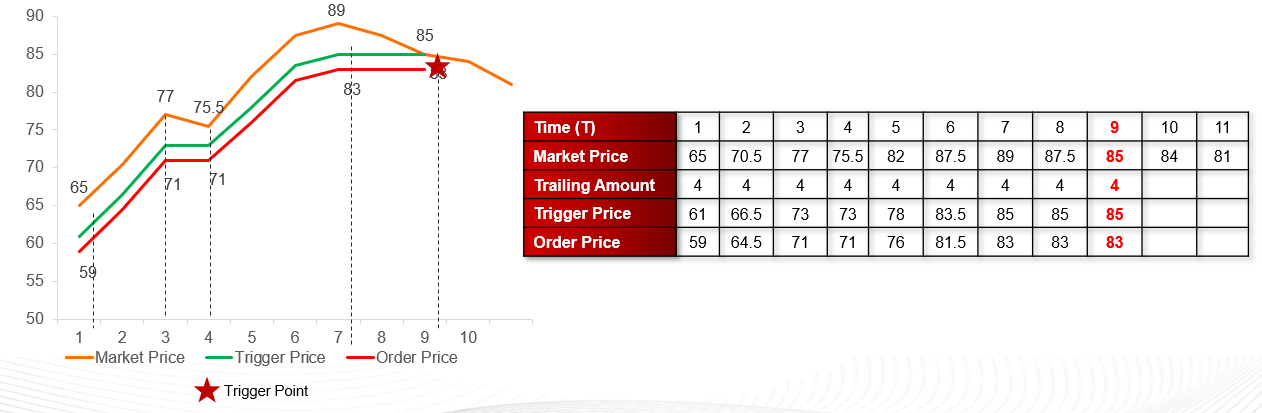
At the first time (T1): Initial trigger price = Market Price - Trailing Amount = 61
Initial price = Initial trigger price – Toler = 59
At subsequent times, the market price increases => trigger price increases corresponding = MAX (Market Price - Trailing Amount, Previous Trigger Price)
At the fourth and eighth time, the market price decreases then increases but the new top point has not been created => trigger price remains unchanged
The market price continues to fluctuate until the market price hits the trigger price at the price of 85, the order is activated with price = trigger price – toler = 83, volume = 1000, the status of conditional order switches to activated
→ Therefore, the Trailing STOP Limit Sell Order helped customers achieve optimal point to sell when the market reverses with the principle of automatic slippage at the market price by a predetermined amount
OCO (ONE CANCELS THE OTHER)
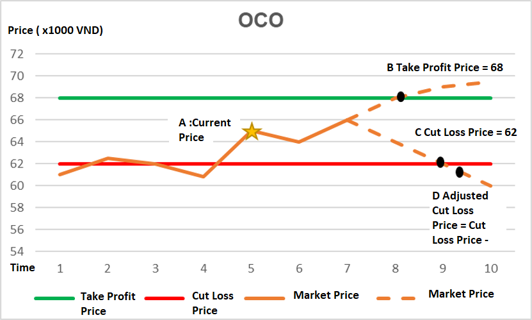
OCO (One-cancels-the-other) is a pair of take profit and auto STOP loss orders at the pre-defined prices. If the take profit order is successfully triggered, when the market price hits the stop loss price, the take profit order will be canceled, the stop loss order will be activated with the unmatched volume of the previous take profit order.
- For stocks: Continue to send stop loss order at 8:30 AM
- For derivatives contracts: Continue to send take profit order at 8:30 AM and check stop-loss conditions
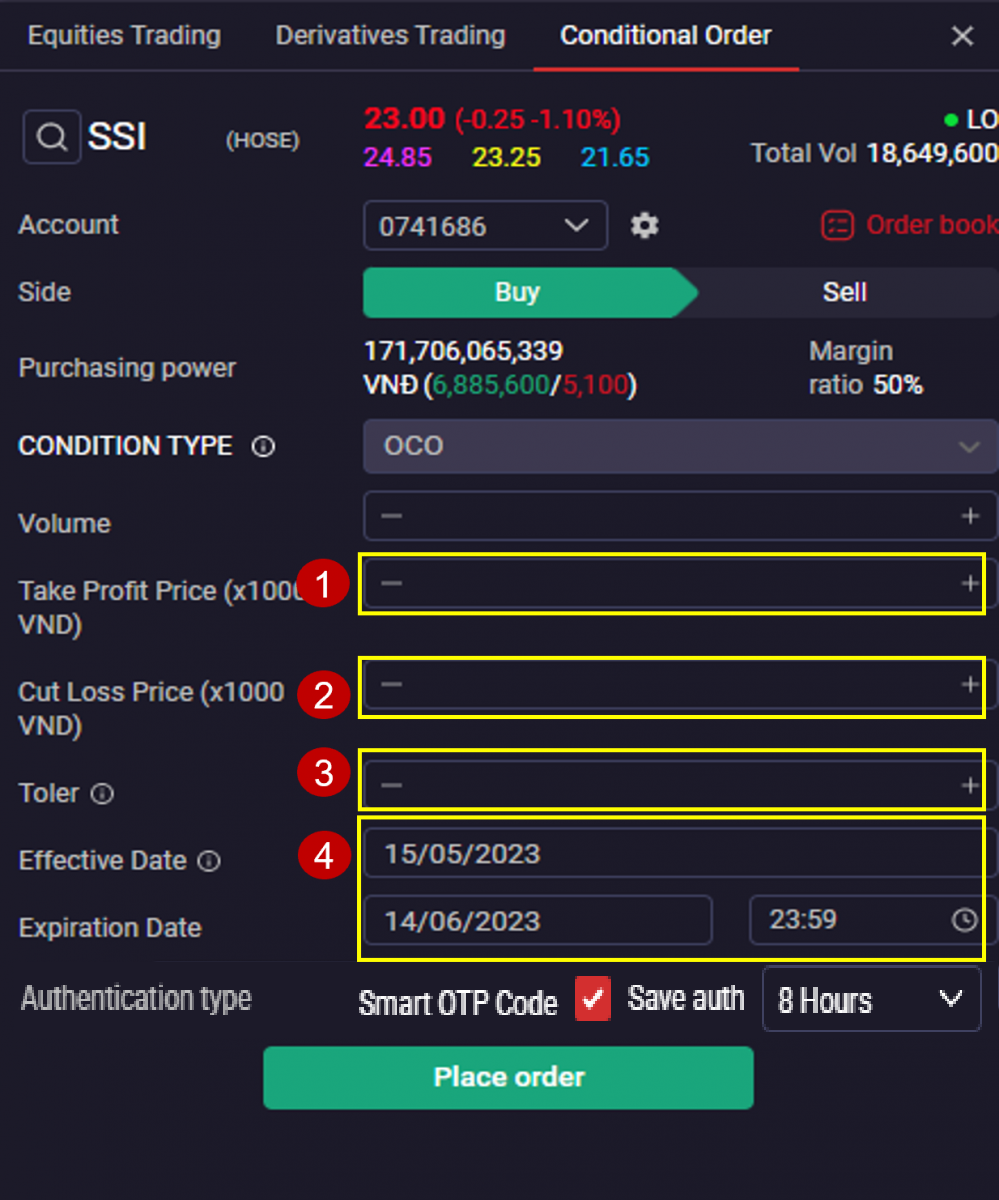
Instructions for Placing order
1. Take Profit Price: Limit Price for the main order to take profit
2. Cut Loss Price: Trigger price for the attached order to cut loss
ØFor buy order: Cut loss price > Take profit price
ØFor sell odder: Cut loss price < Take profit price
3. Toler: The amount of addition/deduction to the preset stop-loss Price and is used to adjust the stop-Loss Price to increase of matching opportunity:ØFor buy order, Adjusted cut Loss = Cut Loss + Toler
ØFor sell order, Adjusted cut Loss = Cut Loss - Toler
4. Choose Effective Date & Expiration Date
Example
Customer A owns FPT at 64, expects to sell FPT at the take profit at 68, cut loss at 62
Customer A will place OCO including take profit 68, cut loss 62, Toler 0.5
After placing order, on the conditional order’s screen, the conditional order will have status Activated:
→ Therefore, OCO orders with pre-set take profit and stop loss ranges will help customers maximize profits and minimize risks in the investment process.
TAKE PROFIT / STOP LOSS - A COMBINATION OF TAKE PROFIT & STOP LOSS
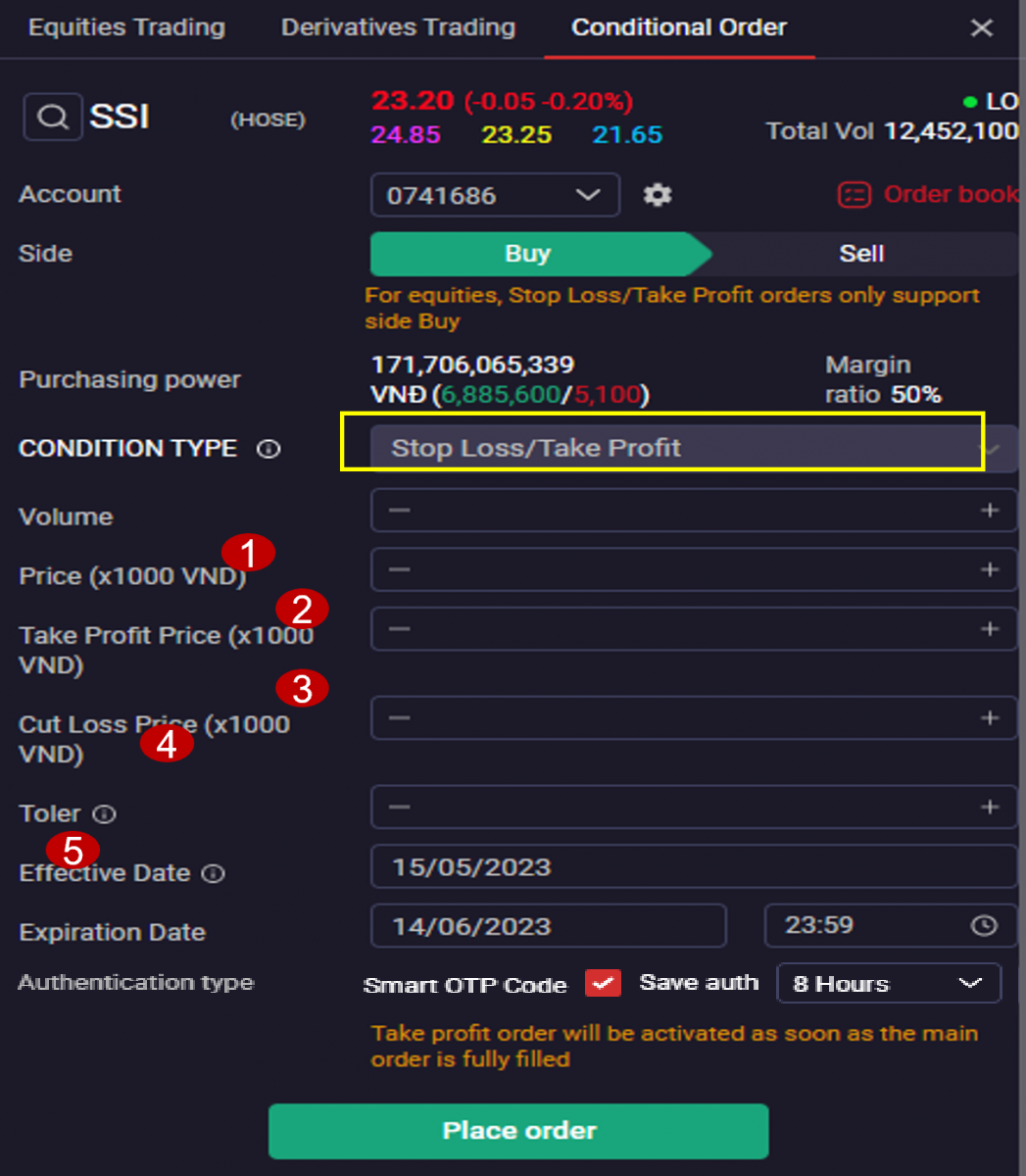
Take Profit/Stop Loss (Bull & Bear) is a combination of a main order (limit order) accompanied with a pair of Take Profit and STOP Loss order. When the main order is fully filled, the automatic take profit or STOP loss order in the opposite direction will automatically be activated at the predefined price and volume at the time of placing the order.
Take Profit/Stop Loss is considered as a combination of 3 orders:
1.Main order: Limit Buy/Sell order and will be the basis for generating conditional orders. If effective date is current date, orders placed from 8:30 AM to the end of trading session (HOSE, HNX exchange and Derivatives: 2:45 PM, UPCOM exchange: 3:00 PM) will be activated immediately after placing. Orders placed outside the above period or selected for multi-day validity will be activated at 8:30 AM daily if the conditions of cash balance, securities and purchasing power and other conditions as for normal orders are satisfied. In case the order satisfies the price condition but does not satisfy other conditions, at 1:00 PM during the day, the system will check the activation conditions with the target trigger price again.
2. Attached order to Take Profit: Limit Buy/Sell order in the opposite direction to the main order to take profit at the expected price
3. Attached order to Stop Loss: Limit Buy/Sell order in the opposite direction to the main order to stop loss
When the main order (1) is fully filled, the attached order to take profit (2) will be automatically triggered. The status of the order will switch to completed at expiration time or when the has been fully filled.
1. Order price: Limit price for the main order
2. Take profit: Limit price for the attached order to take profit
3. STOP loss: Limit price for the attached order to stop loss
ØFor buy order: Take profit > Order price, stop loss < Order price
ØFor sell order: Take profit < Order price, stop loss > Order price
4. Toler: The amount of addition/deduction to the preset stop-loss Price and is used to adjust the stop-Loss Price to increase of matching opportunity:ØFor buy order, Adjusted cut Loss = Cut Loss + Toler
ØFor sell order, Adjusted cut Loss = Cut Loss - Toler
5. Choose Effective Date & Expiration Date
Example
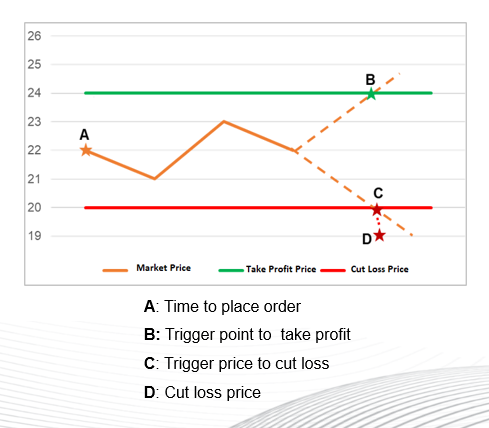
Customer A BUY SSI 22, Volume 1000. Customer A wants to take profit at 24, STOP loss at 20. Customer A will place Take Profit/Cut Loss with order price 22, take profit 24, cut loss 20, toler 1. The customer's conditional order book screen will display following information:
When Main order (1) BUY is fully matched with Volume 1000, attached order (2) SELL to take profit is automatically triggered with order price 24
→ Therefore, with the STOP Loss/Take Profit order, customers can both place new buy orders/buy to increase quantity, manage the investment with pre-set take-profit/stop-loss levels.