


 Vi
Vi
 En
En
 简体中文
简体中文
 日本語
日本語
'%2F><path%20id%3D'Path_249'%20data-name%3D'Path%20249'%20class%3D'cls-1'%20d%3D'M109.655%2C40h-12.9c-.417%2C0-.759.225-.759.5s.341.5.759.5h12.9c.417%2C0%2C.759-.225.759-.5S110.072%2C40%2C109.655%2C40Z'%20transform%3D'translate(-90.407%20-36.388)'%2F><path%20id%3D'Path_250'%20data-name%3D'Path%20250'%20class%3D'cls-1'%20d%3D'M55.836%2C72h-15.2a.514.514%2C0%2C1%2C0%2C0%2C1h15.2a.514.514%2C0%2C1%2C0%2C0-1Z'%20transform%3D'translate(-36.207%20-65.498)'%2F><path%20id%3D'Path_251'%20data-name%3D'Path%20251'%20class%3D'cls-1'%20d%3D'M211.034%2C104h-2.276c-.417%2C0-.759.225-.759.5s.341.5.759.5h2.276c.417%2C0%2C.759-.225.759-.5S211.452%2C104%2C211.034%2C104Z'%20transform%3D'translate(-191.648%20-94.608)'%2F><path%20id%3D'Path_252'%20data-name%3D'Path%20252'%20class%3D'cls-1'%20d%3D'M40.759%2C105h12.9c.417%2C0%2C.759-.225.759-.5s-.341-.5-.759-.5h-12.9c-.417%2C0-.759.225-.759.5S40.341%2C105%2C40.759%2C105Z'%20transform%3D'translate(-35.952%20-94.608)'%2F><path%20id%3D'Path_253'%20data-name%3D'Path%20253'%20class%3D'cls-1'%20d%3D'M55.836%2C136h-15.2a.536.536%2C0%2C1%2C0%2C0%2C1.055h15.2a.536.536%2C0%2C1%2C0%2C0-1.055Z'%20transform%3D'translate(-36.207%20-123.279)'%2F><%2Fsvg>)


Loan Management
Đấu giá mới nhất
Loan Management
The “Loan infomation” screen allows customers to look up information on outstanding loans, review the history of fully paid-off loans and submit online extension requests for eligible loans.
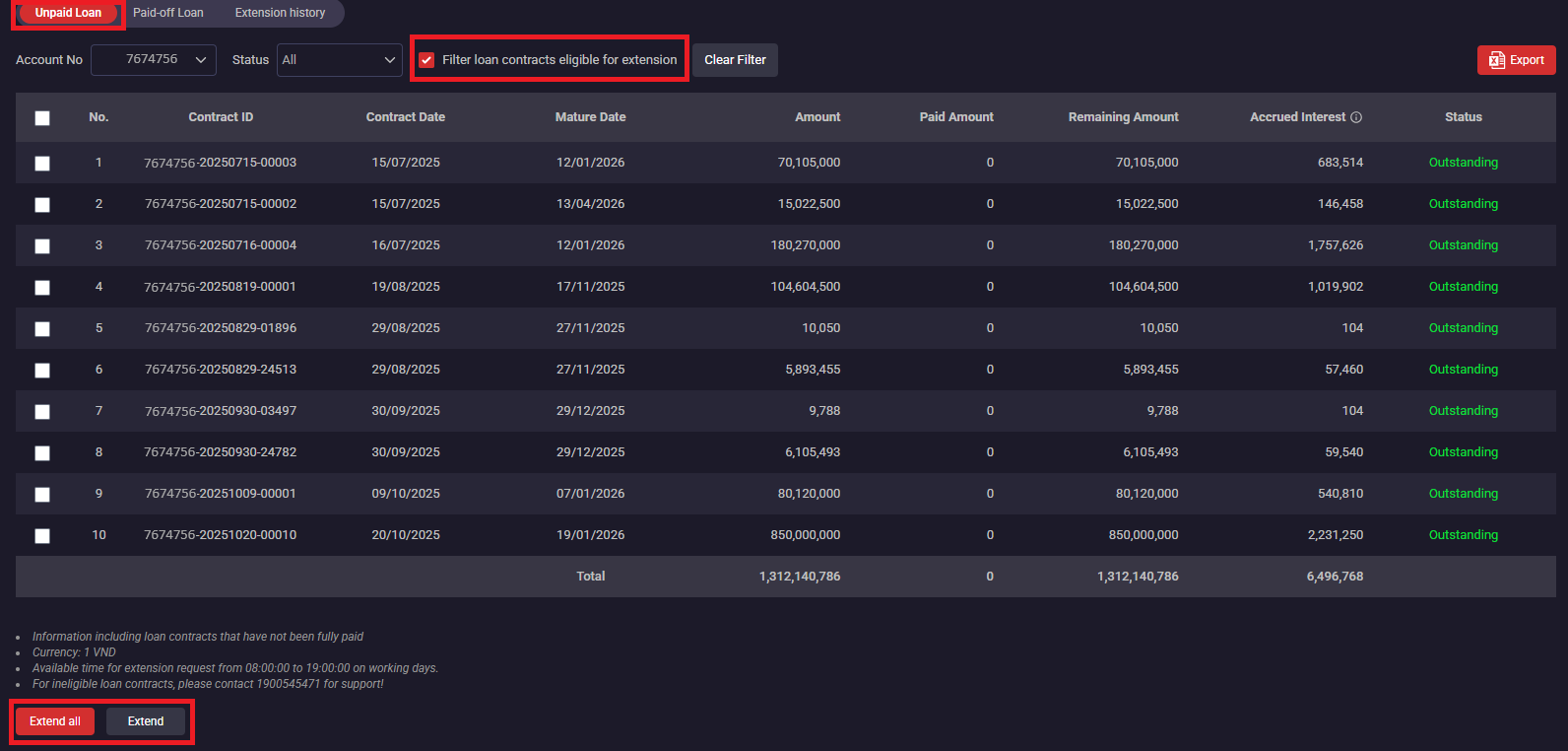
Unpaid Loan: Search for loans that have not been fully repaid using the following filters:
- Account No: The margin trading account number at SSI
- Status: select the status you want to look up including: “All”; “Overdue”; “Partially Settled”; “Outstanding”; “Due”;
- Filter loan contracts eligible for extension: Display loans eligible for renewal
Loan Extension: Allows customers to submit online extension requests for eligible loans based on SSI regulations.
- Step 1: On the “Loan information/Unpaid Loan” screen --> tick “Filter loan contracts eligible for extension”→ choose loans to extend → click “Extend” or “Extend All” to extend all loans in the list.
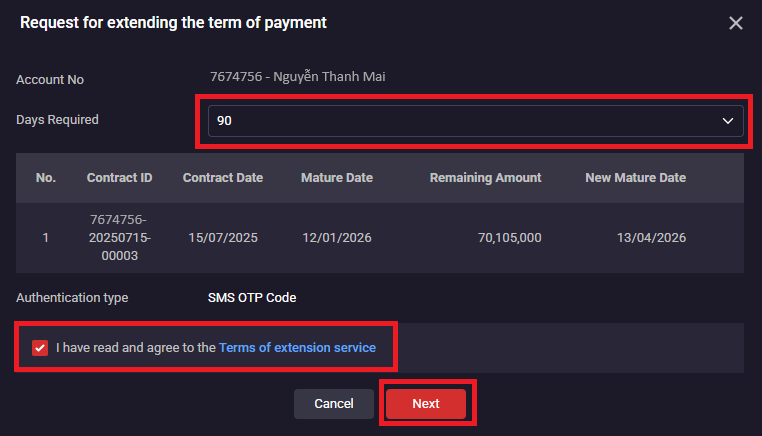
- Step 2: Select "Days Required" and agree to the Terms of extension service, then click "Next"
- Step 3: Enter the OTP code to the authentication method in use, then click "Confirm" to complete the extension request.
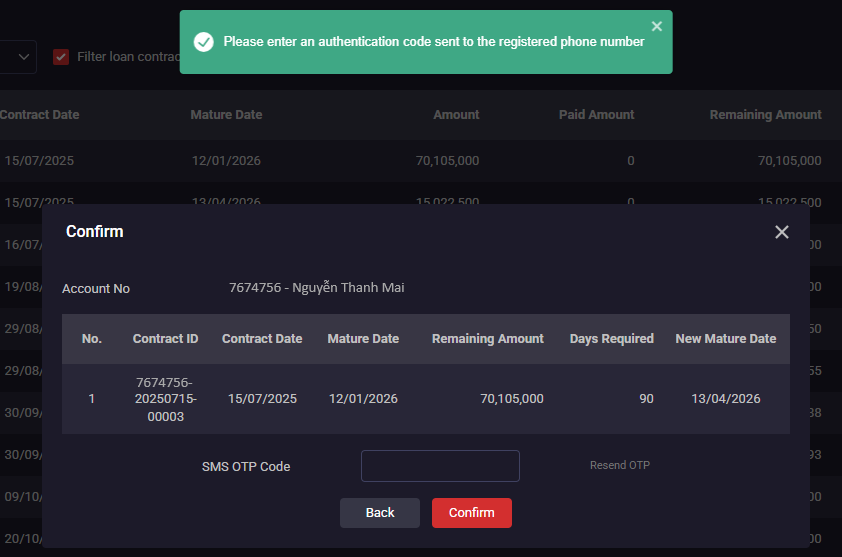
*After submitting the request, customers can check the status of their extended loans through notifications sent to their registered email address.
Paid-off Loan: Look up the history of fully repaid loans using the following filters:
- Account No: The margin trading account number at SSI
- Contract Date: Select the time period to search
- Mature Date: Select the time period to search

Extension history: Search for extended loans using the following filters:
- Account No: Margin trading account number at SSI
- Request Date: Date of renewal request
- Channel: All, Processing, Success, Rejected, Canceled


