


 Vi
Vi
 En
En
 简体中文
简体中文
 日本語
日本語
'%2F><path%20id%3D'Path_249'%20data-name%3D'Path%20249'%20class%3D'cls-1'%20d%3D'M109.655%2C40h-12.9c-.417%2C0-.759.225-.759.5s.341.5.759.5h12.9c.417%2C0%2C.759-.225.759-.5S110.072%2C40%2C109.655%2C40Z'%20transform%3D'translate(-90.407%20-36.388)'%2F><path%20id%3D'Path_250'%20data-name%3D'Path%20250'%20class%3D'cls-1'%20d%3D'M55.836%2C72h-15.2a.514.514%2C0%2C1%2C0%2C0%2C1h15.2a.514.514%2C0%2C1%2C0%2C0-1Z'%20transform%3D'translate(-36.207%20-65.498)'%2F><path%20id%3D'Path_251'%20data-name%3D'Path%20251'%20class%3D'cls-1'%20d%3D'M211.034%2C104h-2.276c-.417%2C0-.759.225-.759.5s.341.5.759.5h2.276c.417%2C0%2C.759-.225.759-.5S211.452%2C104%2C211.034%2C104Z'%20transform%3D'translate(-191.648%20-94.608)'%2F><path%20id%3D'Path_252'%20data-name%3D'Path%20252'%20class%3D'cls-1'%20d%3D'M40.759%2C105h12.9c.417%2C0%2C.759-.225.759-.5s-.341-.5-.759-.5h-12.9c-.417%2C0-.759.225-.759.5S40.341%2C105%2C40.759%2C105Z'%20transform%3D'translate(-35.952%20-94.608)'%2F><path%20id%3D'Path_253'%20data-name%3D'Path%20253'%20class%3D'cls-1'%20d%3D'M55.836%2C136h-15.2a.536.536%2C0%2C1%2C0%2C0%2C1.055h15.2a.536.536%2C0%2C1%2C0%2C0-1.055Z'%20transform%3D'translate(-36.207%20-123.279)'%2F><%2Fsvg>)


Transfer to others
Đấu giá mới nhất
Transfer to others
Step 1: Create request to transfer to bank
- Select menu "Cash Transactions" -> "Transfer to bank"
- Fill in the required content and click "Next" to confirm the transfer information
Click Register/Change information if you want to register new or change registered bank account information.

Step 2: Confirm request
- Enter OTP Code according to the registed authentication method
- Click "Confirm" to complete transaction

Step 3: Lookup transaction history
View the result in the transaction history screen

Step 1: Create request
- Select "Cash transactions" menu > "Internal transfer"
- Fill in transactions information and click "Next" to confirm

Step 2: Confirm request
- Enter OTP
- Click "Confirm" to complete transaction

Step 3: Look up for transactions history
Track the results of internal transfers in the Transaction History screen

Step 1: Create request
- Select "Cash Transactions" menu > "Deposit/Withdraw VSD cash"
- Fill in the amount and click "Next" to confirm request

Step 2: Confirm request
- Enter OTP
- Click "Confirm" to complete transaction

Step 3: Look up for transactions history
Track the results of requests in the Transaction History screen

Withdrawing Unsettled Funds to Margin Account
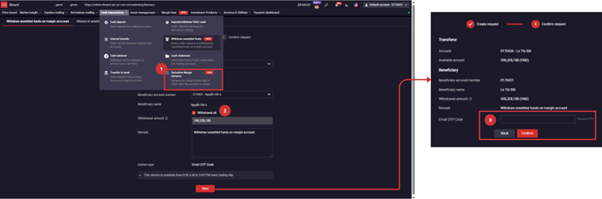
INSTRUCTIONS ON HOW TO WITHDRAW UNSETTLED FUNDS TO MARGIN ACCOUNT
Step 1: Log in to iBoard Web, select Cash Transaction >> Withdraw unsettled funds
Step 2: Enter the Withdrawal amount or choose Withdraw all >> press Next
Step 3: Enter the verification code from your current authentication method to complete the request.
HISTORY OF WITHDRAWING PENDING SALES PROCEEDS TO MARGIN ACCOUNT
Step 1: Log in to iBoard Web, select Cash Transaction >> History of unsettled funds withdrawal on Margin Account.
Step 2: View the history of unsettled funds withdrawal using time and status filters.


